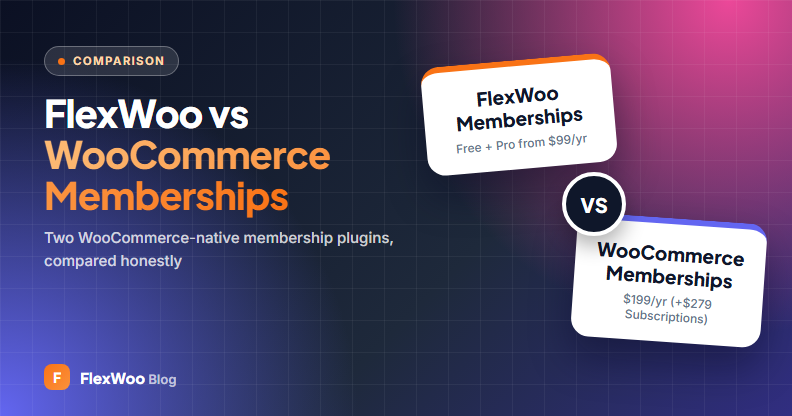
If you run a WooCommerce store and want to sell memberships, two plugins are built to live inside WooCommerce rather than next to it: the official WooCommerce Memberships extension and FlexWoo Memberships. Both sell memberships as WooCommerce products, both lock content and both use WooCommerce’s My Account page for members.
So what is actually different? This FlexWoo Memberships vs WooCommerce Memberships comparison covers pricing, recurring billing, features and where each one is the better choice.
Full disclosure: we make FlexWoo Memberships. We have tried to be fair, every WooCommerce Memberships fact below comes from its official product page (checked October 2026), and we say clearly where the official extension is the better pick.
Key takeaways
Quick Verdict
Choose FlexWoo Memberships if you want memberships and automatic renewals in one plugin, a free version to start with and lower long-term cost. Choose WooCommerce Memberships if you already pay for WooCommerce Subscriptions, need team or company memberships through its Teams add-on, or prefer an official WooCommerce.com extension with a long history.
Pricing
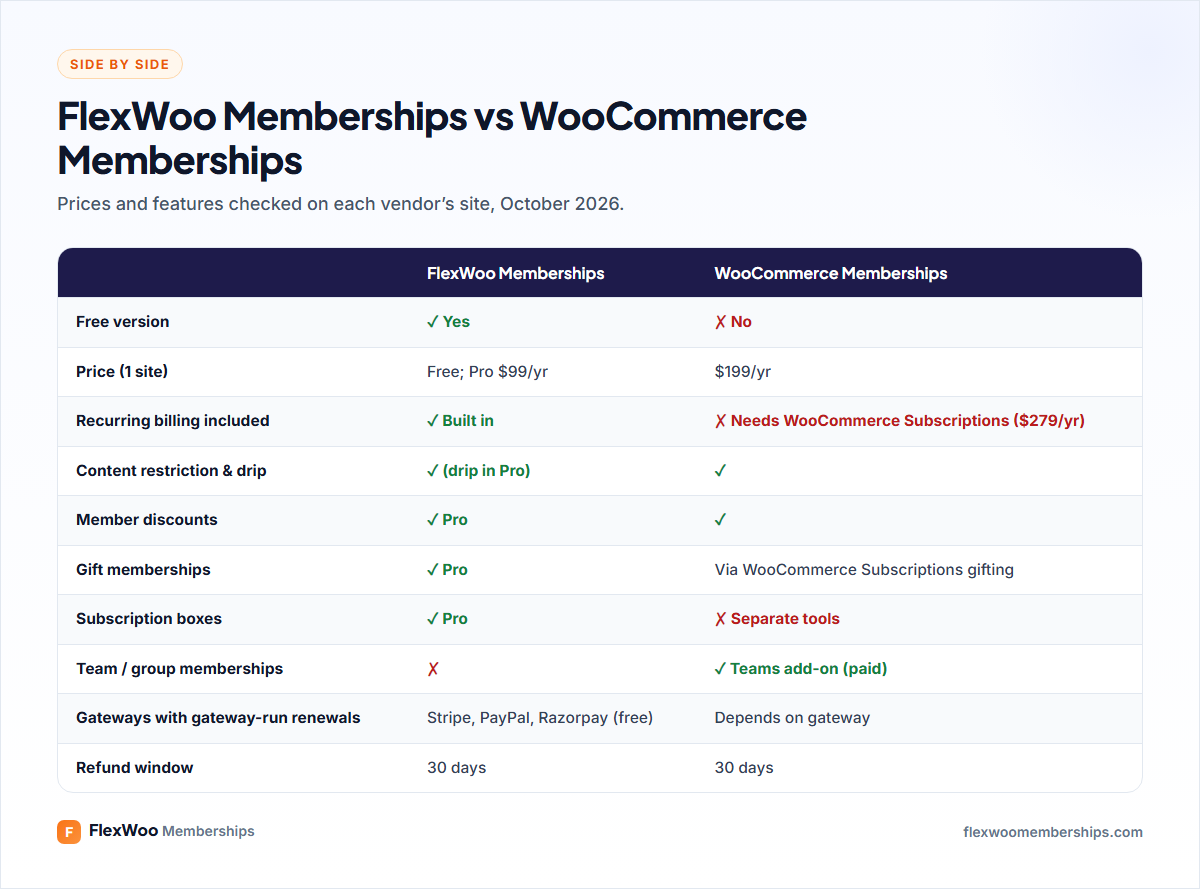
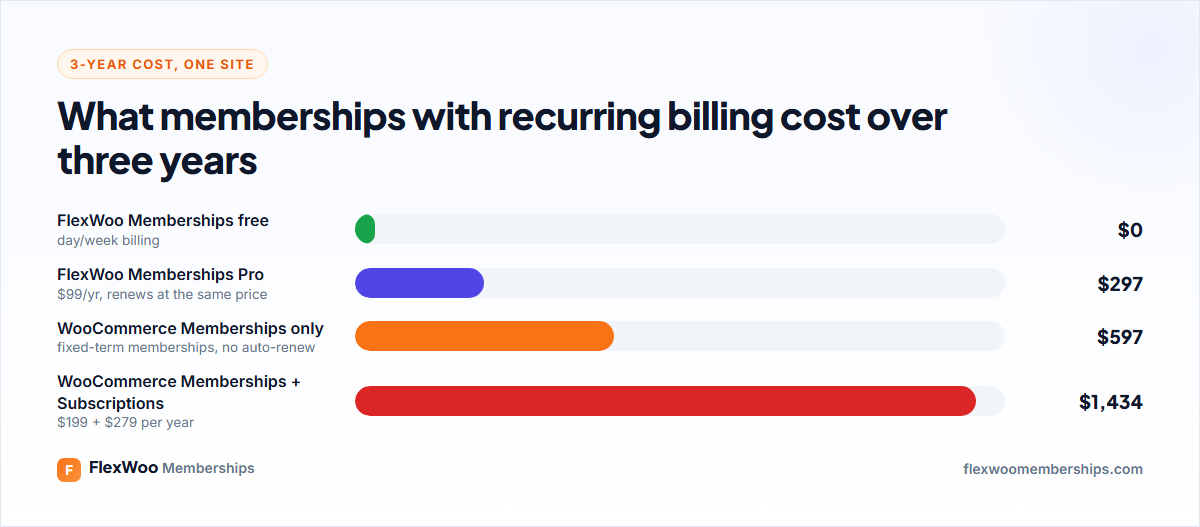
WooCommerce Memberships costs $199 a year for one site, with a 30-day money-back guarantee. On its own it sells memberships for a set term; for automatic recurring billing and trials you also need WooCommerce Subscriptions at $279 a year. That is $478 a year for the pair.
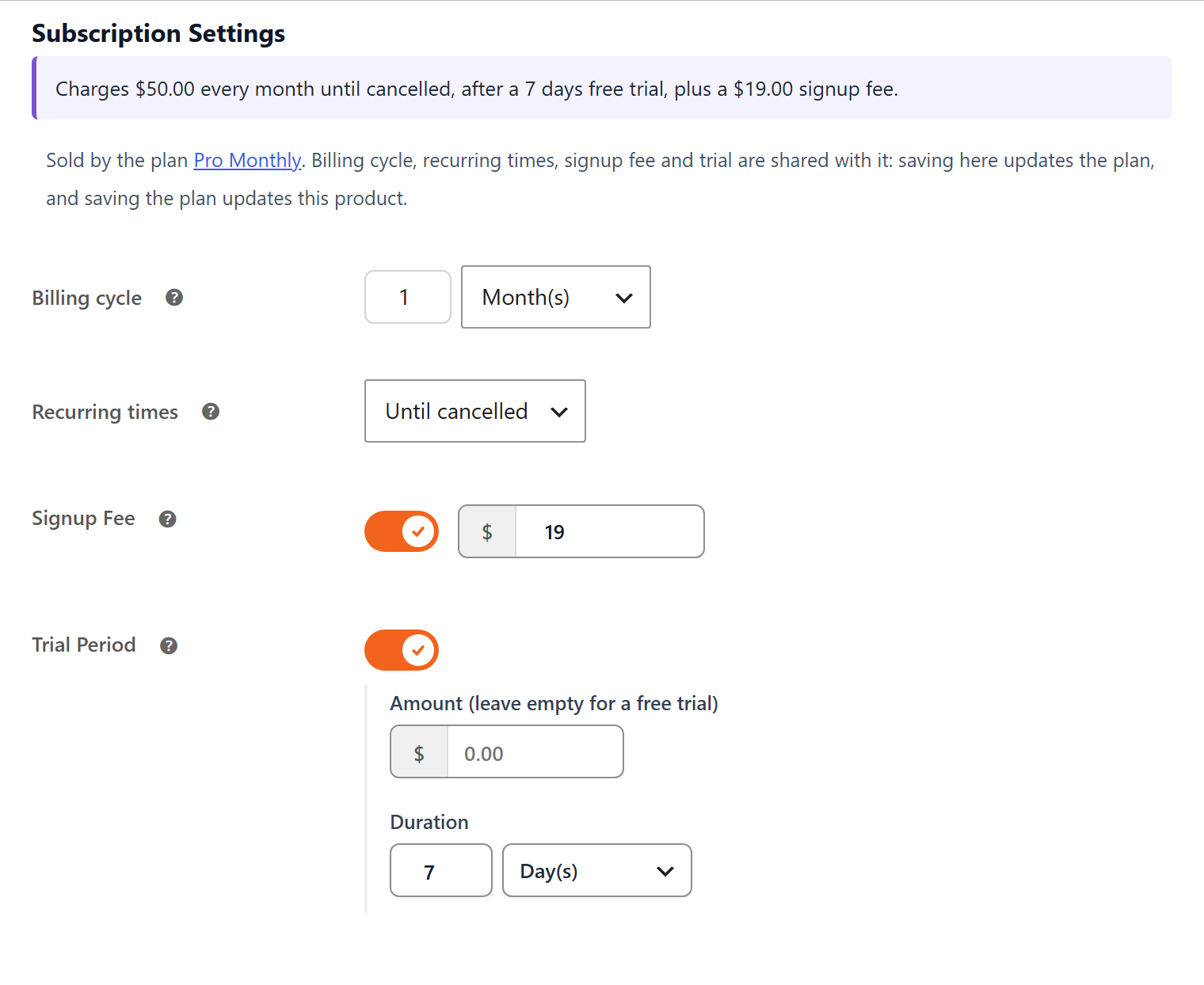
FlexWoo Memberships has a free version that includes subscriptions on daily and weekly cycles. Pro starts at $99 a year for one site and renews at the same price, also with a 30-day guarantee. Pro adds monthly and yearly billing, trials and signup fees.
Recurring Billing
This is the main architectural difference. WooCommerce Memberships handles access; WooCommerce Subscriptions handles billing. They integrate well, but they are two products to buy, update and configure.
FlexWoo has its own subscription engine. Plans, renewals, reminders, failed-payment handling and member access are managed in one place. With the free FlexWoo Stripe, PayPal and Razorpay gateways, subscriptions can be billed by the gateway itself (Stripe Billing, PayPal Subscriptions, Razorpay Subscriptions), so renewals keep happening even if your site is down, or by your site if you prefer full control.
Already on WooCommerce Subscriptions? FlexWoo works alongside it: a FlexWoo membership linked to a WooCommerce Subscriptions product starts, renews, pauses and ends with that subscription.
Content Restriction and Drip
Both restrict pages, posts and products, both can hide products from non-members or stop them buying, and both support drip content to release items over time. WooCommerce Memberships includes drip in the base price; in FlexWoo, drip and the designed paywall card are Pro features, while basic restriction (redirect or alternative content) is free.
FlexWoo adds an Access Rules table that lists every page, post and product with the plans that can open it, and a Rule Debugger that explains why a specific member can or cannot see a page. Both save time when you have a lot of content.

Member Discounts, Gifts and Boxes
Both plugins offer member discounts on products. WooCommerce Memberships lets you set discounts for all products, some products or categories. FlexWoo Pro offers a plan-wide percentage, per-member overrides and renewal pricing that gets cheaper the longer someone stays.
For gifting, WooCommerce Subscriptions now includes gift subscriptions. FlexWoo Pro has gift memberships with a delivery date, message and claim link, and also a subscription box product type where customers build their own box. WooCommerce Memberships has nothing built in for boxes.
Groups and Teams
Here WooCommerce Memberships has a clear edge. Its Teams for WooCommerce Memberships add-on (sold separately) lets one buyer purchase seats for a company or class. FlexWoo does not have team seats; the closest is limiting signups to allowed e-mail domains for company or school memberships.
Member Experience
Both use the WooCommerce My Account page. WooCommerce Memberships has a Member Area listing each membership’s content. FlexWoo adds Memberships and Subscriptions tabs, a welcome banner, and with Pro lets members switch, pause and cancel themselves with optional proration, plus ten member blocks and Elementor widgets such as a pricing table and drip schedule.
Track Record and Support
WooCommerce Memberships is a mature extension: around 30,000 active installs and a 4 out of 5 rating from 152 reviews on WooCommerce.com at the time of writing, with support from the WooCommerce.com team. FlexWoo Memberships is younger with a smaller community; support is through the WordPress.org forum for the free plugin and priority e-mail for Pro.
Requirements
WooCommerce Memberships lists PHP 7.4, WordPress 5.6 and WooCommerce 3.9.4 as minimums, so it runs on older hosting. FlexWoo requires PHP 8.2, WordPress 6.4 and WooCommerce 9.0 or newer. On modern hosting this is not an issue; on an old server, it matters.
Which Should You Choose?
| If you… | Choose |
|---|---|
| Want memberships and recurring billing in one plugin | FlexWoo Memberships |
| Want to start free | FlexWoo Memberships |
| Want the lowest cost over several years | FlexWoo Memberships |
| Sell subscription boxes or Razorpay subscriptions in India | FlexWoo Memberships |
| Already pay for WooCommerce Subscriptions and like it | Either; WooCommerce Memberships is the natural pair |
| Need team or company seats | WooCommerce Memberships + Teams |
| Run old hosting below PHP 8.2 | WooCommerce Memberships |
For a wider view, see our roundup of the best WordPress membership plugins and the in-depth FlexWoo Memberships review.
FAQ: FlexWoo vs WooCommerce Memberships
The Bottom Line
Both plugins keep your membership inside WooCommerce, which is the right call for any store. WooCommerce Memberships is the established, official option and shines for team memberships. FlexWoo Memberships bundles subscriptions in, starts free and costs less over time. The easiest way to decide is to install the free version of FlexWoo, build one plan and see how it fits your store.