Skip to content
Launch offer
FlexWoo Pro is live: 30% off every plan
Launch offer: 30% off Pro
Code: FLEXLAUNCH30
  • 00
    d
  • 00
    h
  • 00
    m
  • 00
    s

Drip Content: What It Is and How to Schedule Lessons for Members

In this article

Picture a new member logging in for the first time and finding 140 lessons. Some will dive in. Most will scroll, feel behind before they have started, and quietly cancel next month. Too much content at once can be just as bad as too little.

Drip content fixes this by releasing lessons on a schedule. This guide explains what drip content is, when it helps and when it annoys people, how to plan a schedule, and how to set it up on a WordPress membership site.

Key takeaways

Drip content releases lessons or posts a set number of days after someone joins.

It gives new members a clear first step, prevents “binge and cancel” and keeps people coming back.

Do not drip reference material people need straight away, like templates or a search-able library.

You can drip by plan, so higher tiers get content sooner.

What Is Drip Content?

Drip content is content that unlocks gradually instead of all at once. Each lesson, post or download becomes available a set number of days after a member joins, for example module one on day 0, module two on day 7. The name comes from drip e-mail campaigns, which send messages on a schedule.
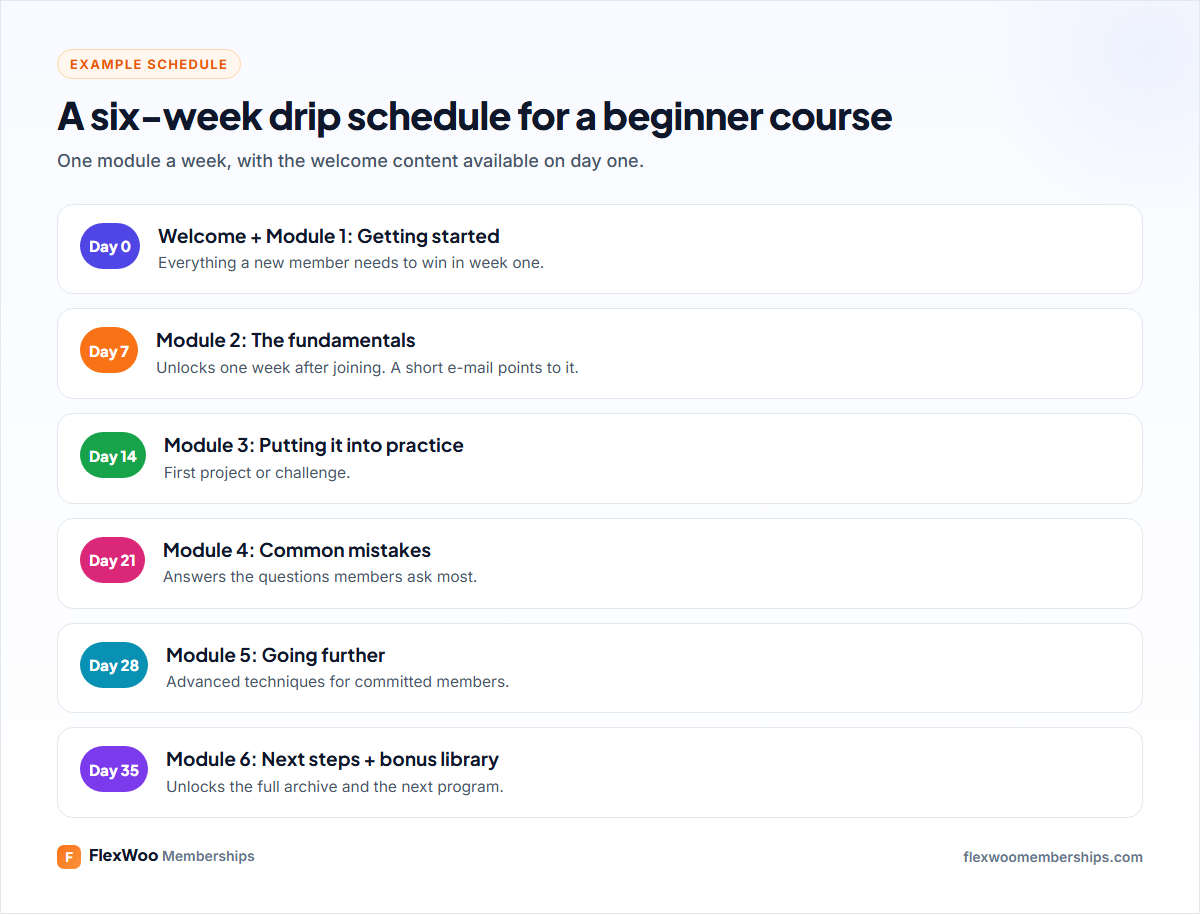
Example drip schedule for a six-week course

Why Drip Content Works

A clear starting point. New members know exactly what to do this week.

Better completion. Small, regular steps are easier to finish than a huge library.

Less “binge and cancel”. Members who download everything in month one have no reason to stay for month two.

A reason to come back. “New lesson unlocked” is a natural, welcome e-mail to send.

Fewer refund requests on courses, because people cannot consume everything and ask for their money back.

When You Should Not Drip Content

Drip content is a tool, not a rule. It frustrates members when:

the content is reference material people need on demand, like templates, recipes or a knowledge base;

members are paying a premium and expect everything immediately;

the schedule is too slow, so motivated members sit waiting.

A good middle ground: drip the structured program, and keep a reference library open from day one.
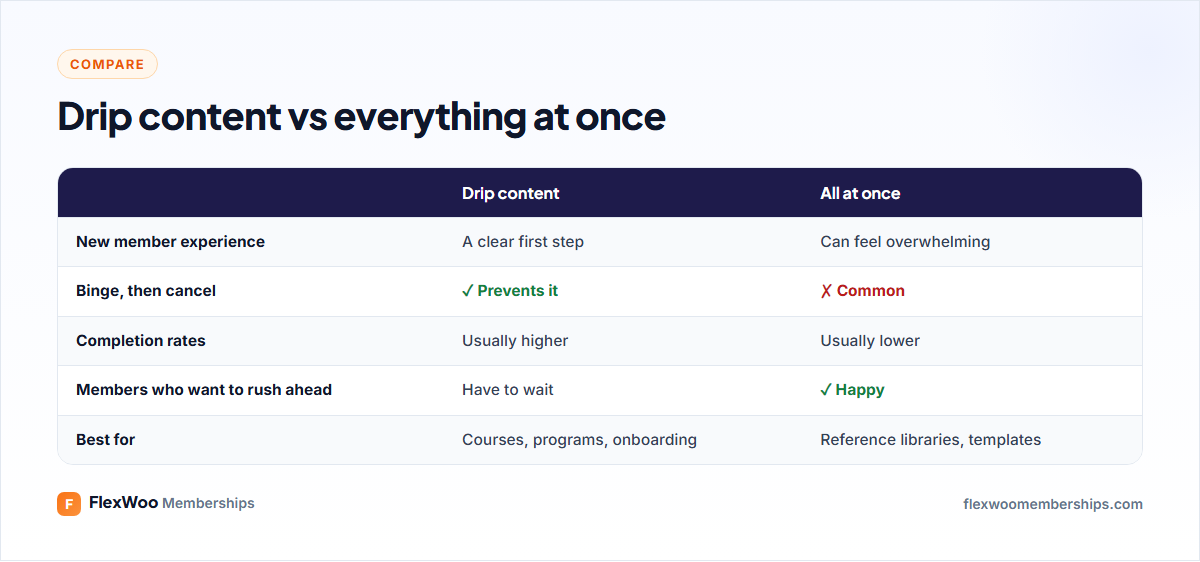
Drip content vs releasing all content at once

Two Ways to Schedule Drip Content

Relative to when each member joins

Every member gets the same journey, starting on their own signup date. Someone who joins today gets module two in seven days; someone who joins next month gets it seven days after that. This is ideal for evergreen courses and onboarding, and it is how drip works in most membership plugins, including FlexWoo.

On fixed calendar dates

Everyone gets new content on the same date, which suits cohort programs that start together, or a monthly magazine. In WordPress, the simplest way to do this is to schedule posts to publish on those dates in a members-only category, so they appear for all members at once.

How to Plan a Drip Schedule

Start with the outcome. What should a member be able to do after four or six weeks?

Front-load the first win. Day 0 should include enough for a quick, real result.

Pick a rhythm and stick to it. Weekly is the most common. Faster for short programs, slower for deep ones.

Keep each step small. One module a week that takes 30–60 minutes is easier to keep up with than a three-hour block.

Tell members what is coming. A visible schedule builds anticipation instead of frustration.

How to Set Up Drip Content in WordPress

With FlexWoo Memberships Pro, drip settings live on each page, post or product:
Make sure the content is unlocked by a plan (see how to restrict content in WordPress).

Edit the page, post or product you want to drip.

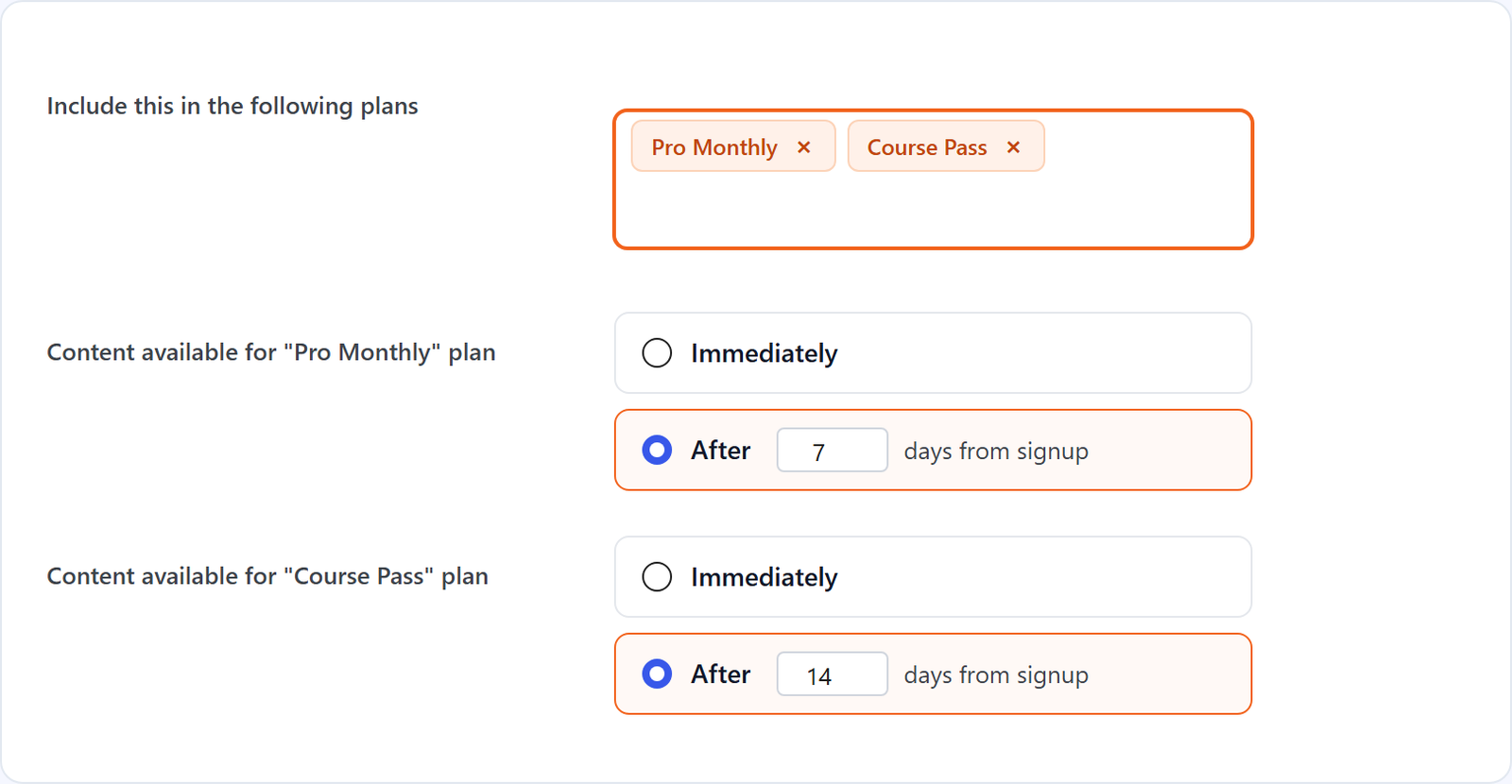
In the Membership Options panel, choose the plans that unlock it.

For each plan, set After N days from signup, for example 7.

Update the post. Repeat for each lesson.

Content available after a number of days from signup, per membership plan
Drip settings on a post: available a number of days after signup, per plan

Until the delay passes, the content stays hidden for that member, even though their plan unlocks it. Because the delay is set per plan, you can reward higher tiers: Gold members get a module on day 0 while Silver members wait 7 days.

Show Members What Is Coming

Nothing frustrates members like a locked lesson with no explanation. The Drip Content Schedule block (and matching Elementor widget) shows the logged-in member which content is available and what unlocks when. Put it on your members’ home page or at the top of the course.
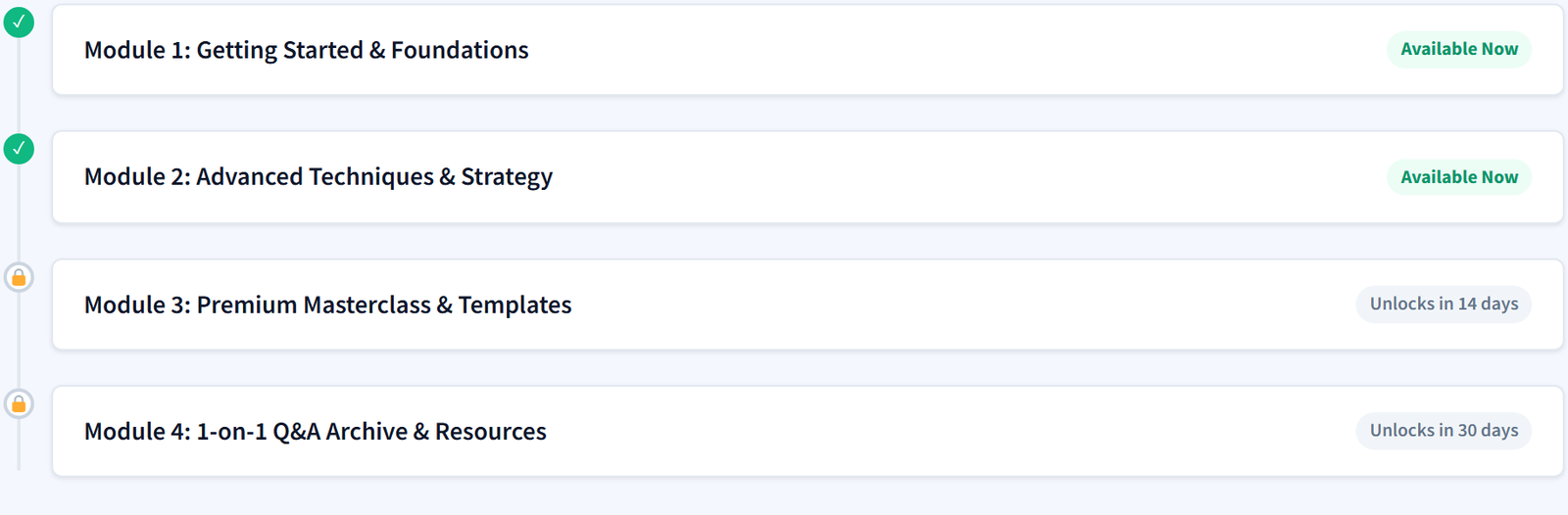
Drip schedule block showing available and upcoming modules
The Drip Schedule block showing available and upcoming modules

Pair it with a short e-mail when each module unlocks. It does not need to be fancy: “Module 3 is ready: here is the link” is enough to bring people back.

Testing Your Drip Schedule

Test drip as a real member, not as an admin, since administrators see everything. Create a test member, check that day-0 content is available and later lessons are hidden, and confirm the Drip Schedule block shows the right dates. If a member asks why they cannot see a lesson, check the drip delay on that item first, then use the Rule Debugger under FW Memberships → Tools to see which rule allows or blocks it.

FAQ: Drip Content

Drip content means releasing content gradually instead of all at once. Lessons, posts or files unlock a set number of days after a member joins, or on set dates, so members move through the material step by step.
For structured programs and courses, yes. It gives new members a clear first step, improves completion and reduces people who consume everything and cancel. For reference libraries, templates and recipes, releasing everything at once is usually better.
Weekly is the most common rhythm and works for most courses. Short programs can drip every few days, deep programs every one to two weeks. Keep each release small enough to finish before the next one arrives.
Yes. In FlexWoo Memberships Pro the delay is set per plan on each item, so a premium tier can get a module on day 0 while a basic tier waits a week.
They should. FlexWoo Memberships Pro includes a Drip Content Schedule block and Elementor widget that show each member what is available now and what unlocks when.
Yes. In FlexWoo Memberships Pro you can drip pages, posts and products, so a members-only product or download can unlock a set number of days after someone joins.

Give Members a Path, Not a Pile

Drip content is really about respect for your members’ time. Instead of handing them a pile, you hand them a path: this week’s step, and a reason to come back next week. Use it for your programs, keep your reference material open, and show people what is coming. If you sell courses, our guide to selling online courses with WooCommerce puts it all together.
Start Selling Memberships on WooCommerce, Free
Membership plans, content restriction and recurring Stripe, PayPal & Razorpay payments in one plugin. The free plugin stays free.
Enter the URL of your WordPress website to get started
By continuing you agree to our Privacy Policy.
FlexWoo Memberships plan builder illustration with a subscription plan

Share this article

Leave a comment

On this page

Ready to sell memberships from your WooCommerce store?

Start free with FlexWoo Memberships, then upgrade to Pro when you need drip content, paywalls, gifts and analytics.